Packages arrive, they are not retyped
CAMO hands a work package across; production accepts it into a project with its cards, scope and due dates intact.
Part-145 MRO production software: base, line, shop and internal work planned, executed and closed where the record lives. Time booked on a work order becomes the labour invoice; nothing is re-entered.
For the production planner who hands out cards, and the accountant who invoices the hours.

CAMO hands a work package across; production accepts it into a project with its cards, scope and due dates intact.
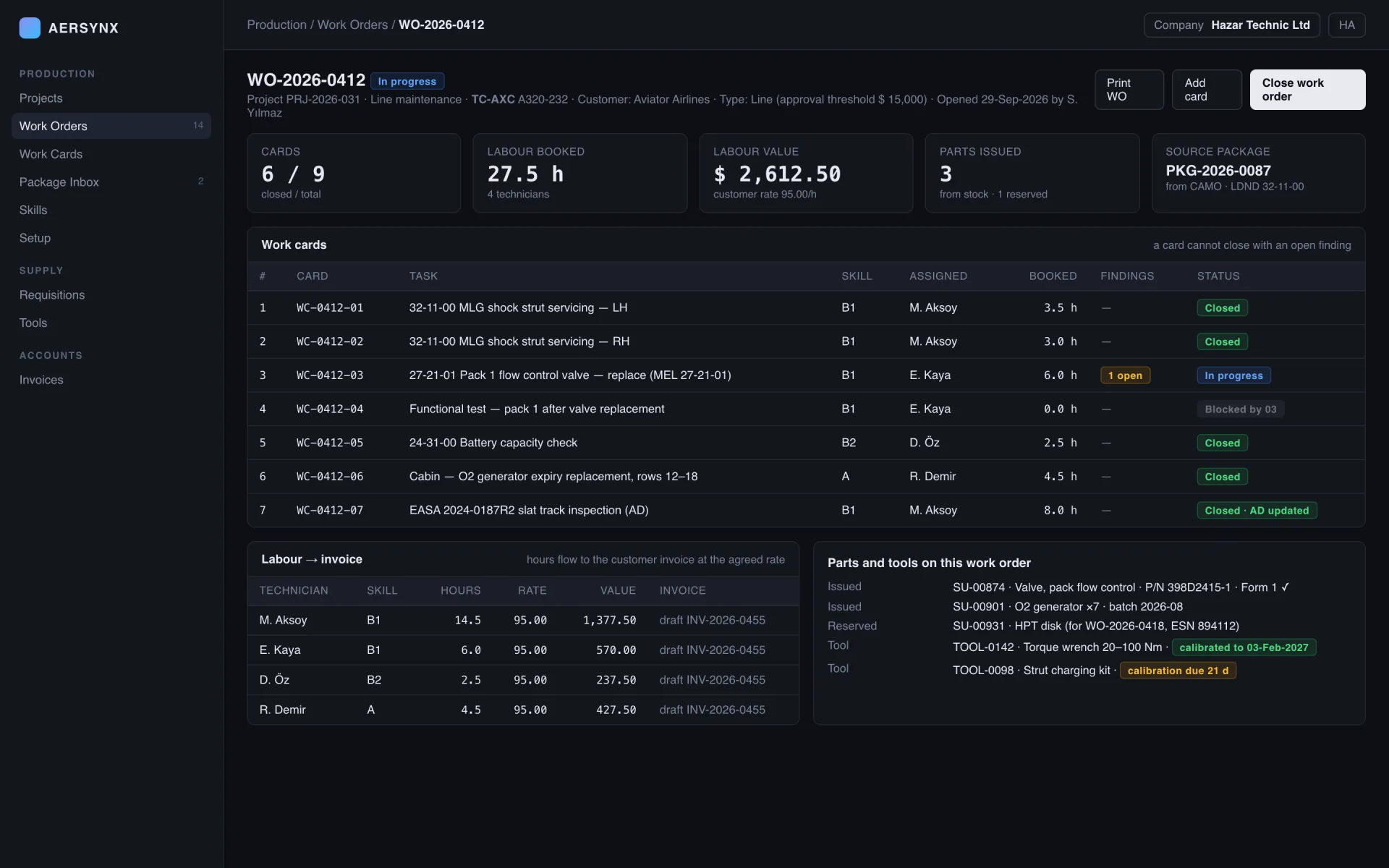
Time booked on a card flows to the customer labour invoice at the agreed rate. The hangar and the ledger see the same number.
Open findings block closure, an out-of-calibration tool is refused on the card, and parts issued from stock carry their certificate.
Three columns the planner watches, one line the accountant reads.
PKG-2026-0087LDND 32-11-00 handed overaccepted 29-Sepscope and due dates intactWO-2026-0412 · TC-AXCtype threshold $15,0009 cards · 6 closedskills required, tools checkedWC-0412-03 · 1 opencard blocked until closed27.5 h × 95.00 = $2,612.50draft INV-2026-0455Work orders with approval thresholds by type, and the cards beneath them carrying tasks, skills, findings and sign-offs. A card cannot close while a finding is open; a tool out of calibration is refused on the card; a part issued from stock arrives with its certificate.
Hours recorded against a work order flow into the customer labour invoice at the agreed rate, technician by technician. The hangar and the ledger see the same number, and the invoice is a draft until someone with the right title confirms it.
| Module | Primary job | Signals |
|---|---|---|
| Projects | Maintenance projects by type | base · line · shopcost centre per project |
| Work Orders and Work Cards | Work execution and sign-off | thresholds by typefindings block closure |
| Package Inbox | Packages from CAMO | from CAMO, no retypingscope intact |
| Skills and Setup | Skills, authorisations, thresholds | skill required per cardauthorisations |
| Labour to invoice | Hours to customer invoice | hours → draft invoicecustomer rate |
Maintenance projects for base, line, shop and internal work, each carrying its own work orders, cards, cost centre and the company whose ledger pays for it. A project is visible to the organisation; its costs are filtered by the viewer's company access.
Work orders with approval thresholds by type, and the cards beneath them carrying tasks, skills, findings and sign-offs. A card cannot close while a finding is open; a tool out of calibration is refused on the card; a part issued from stock arrives with its certificate.
Work packages arriving from CAMO engineering are accepted into production with their cards, scope and due dates intact. The package that closes in the hangar updates the aircraft record the CAMO reads, so the two organisations never reconcile.
Personnel skills and authorisations, work order types and their approval thresholds. A card asks for a skill; a person without it cannot be assigned. Thresholds are set once per type and applied on every order.
Hours recorded against a work order flow into the customer labour invoice at the agreed rate, technician by technician. The hangar and the ledger see the same number, and the invoice is a draft until someone with the right title confirms it.
The questions this workspace gets asked most often.
It plans, executes and closes maintenance work in an approved Part-145 organisation: projects, work orders, work cards, the skills and tools each task needs, and the labour that work consumes. AerSynx runs it against the same aircraft record the CAMO maintains, so the work and the compliance evidence are not two systems.
Directly. Time booked against a work order flows to the customer labour invoice at the agreed rate — nobody retypes a timesheet into an accounting system at the end of the month. The invoice line can be traced back to the work order, the card and the person who booked the hours.
No. A finding raised on a card blocks that card from closing until it is rectified or formally deferred. The rule is enforced where the record lives rather than by a reminder, because a card that closes around an open finding is exactly what an audit is looking for.
Maintenance programme tasks and directive requirements arrive in a package inbox as work, not as a PDF to be re-entered. The planner turns the package into work orders and cards, and the compliance closure returns to CAMO when the work is signed off.
Pick a package from your CAMO, open it in production, book hours on two cards and watch the draft invoice appear. That is the whole loop.