Who could, who did, where it sits
Authority comes from title, action scope, company access and approval limits; every successful change is written with who, what and when.
Who could change a record, whether the change was recorded, and where the evidence sits — answered by the system rather than by memory, with sanctions screened every night.
For the quality manager who answers the auditor, and the compliance officer who answers the regulator.

Authority comes from title, action scope, company access and approval limits; every successful change is written with who, what and when.
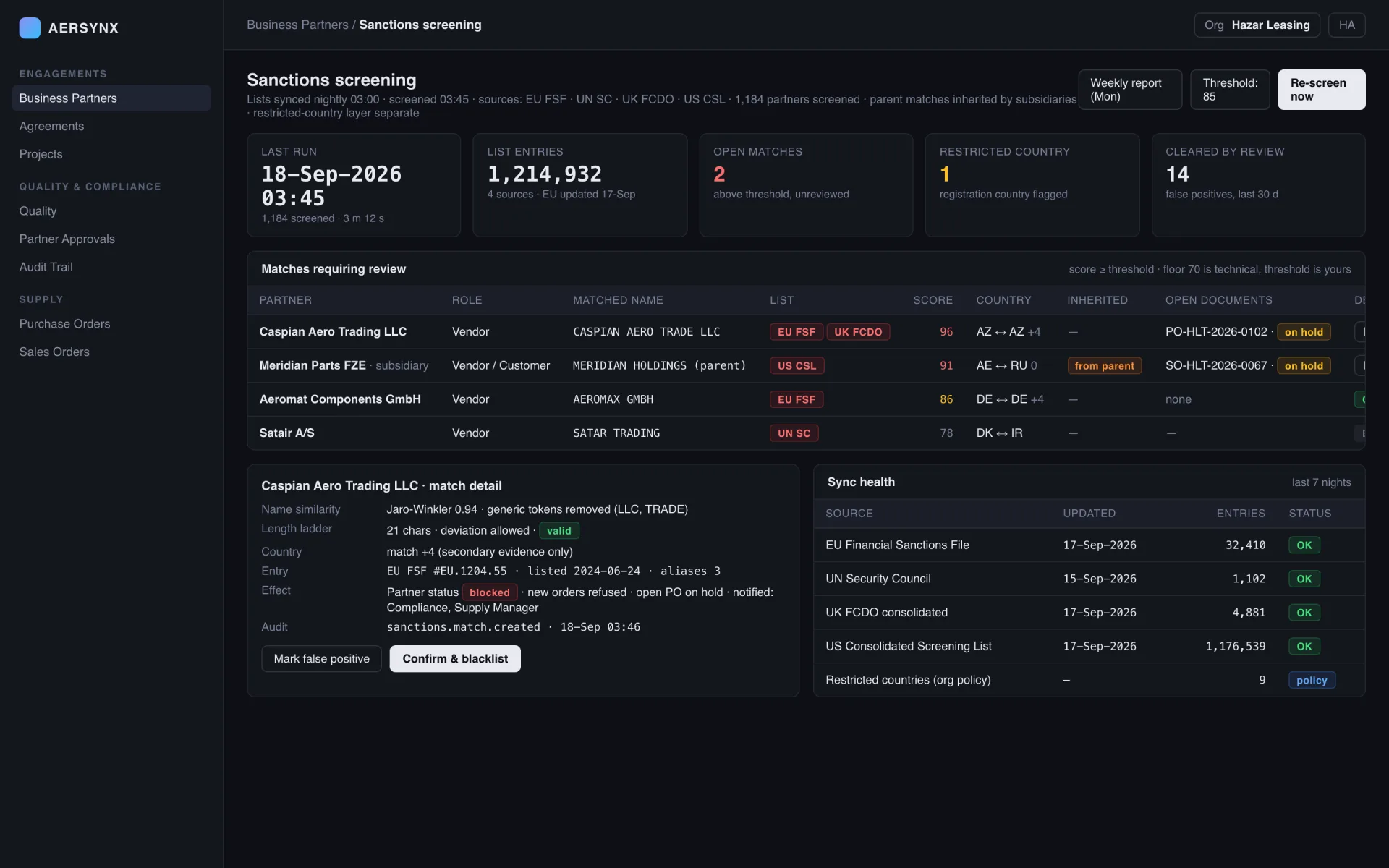
Four sanctions lists synced nightly, every partner screened, parent matches inherited, matched partners flagged for compliance review.
Gaps from CAMO and discrepancies from records arrive as findings; an open finding gates the work card that would otherwise close.
Everything that goes wrong becomes a finding; everything that closes leaves a line.
AD revision gap · TC-AXBor two documents that disagreeFND-2026-0091raised with severityS. Yılmaz · CAMO analystassigned, notified02-Oct-2026on the horizon like everything elseForm 1 · OCR completethe record that closes itclosed by ownera card cannot close around itquality.finding.close · 18-Sep 16:02who · what · when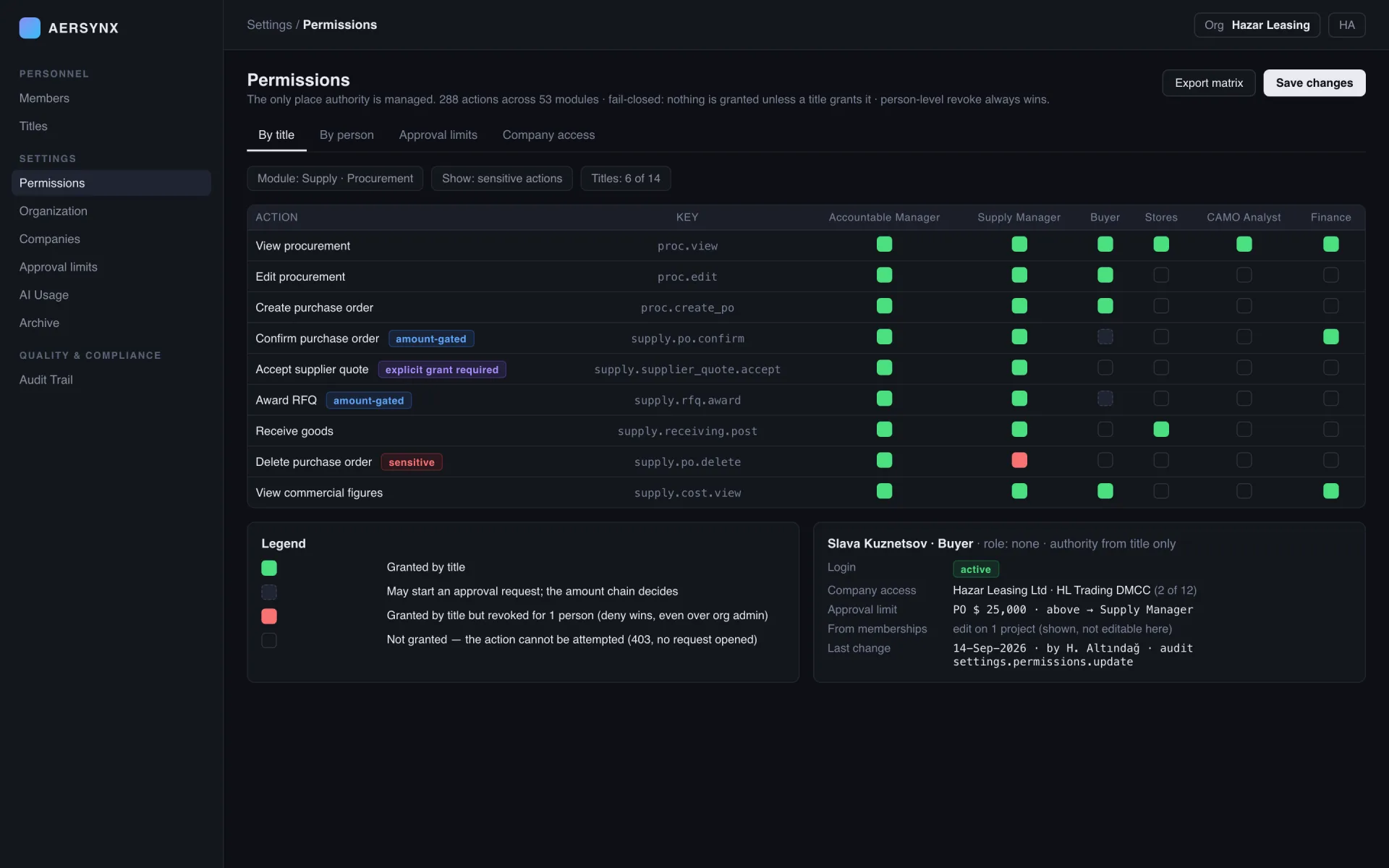
One partner master for vendors, customers and partners, screened every night against the EU, UN, UK and US lists. A match on a parent company is inherited by its subsidiaries, restricted countries are a separate layer, and a matched partner is flagged on its record with a notification to compliance.
Authority from title, action scope, company access and approval limits, managed on one screen: every permissioned action named, fail-closed, a person-level revoke that beats even the organisation admin. Login access and employment are separate axes; a title cannot be held without a login.
| Module | Primary job | Signals |
|---|---|---|
| Quality | Findings, documents, stamps, training | controlled documentsstamps & authorisations |
| Audit Trail | Who, what, when | who · what · whenwritten after the response |
| Business Partners and Sanctions | Partner master, nightly screening | 4 lists, nightlyparent match inherited |
| Agreements and Projects | Agreements and commercial projects | expiry reminderscompany-owned |
| Permissions, Titles and Companies | Authority on one screen | every action namedfail-closed |
Findings, controlled documents with revisions and distribution, announcements, partner approvals, authorisations, stamps and training records in one workspace. The current version of a controlled document is unambiguous.
Every successful change written with who, what and when, after the response returns so the trail never slows the work. Explorable across the whole organisation, filterable by module, entity and person.
One partner master for vendors, customers and partners, screened every night against the EU, UN, UK and US lists. A match on a parent company is inherited by its subsidiaries, restricted countries are a separate layer, and a matched partner is flagged on its record with a notification to compliance.
Commercial agreements with expiry countdown and reminders at configured thresholds, owned by a company; commercial projects that gather the demand, orders, stock and sales of one venture with the parties in their roles. Partial project totals say how many records were hidden from the viewer.
Authority from title, action scope, company access and approval limits, managed on one screen: every permissioned action named, fail-closed, a person-level revoke that beats even the organisation admin. Login access and employment are separate axes; a title cannot be held without a login.
The questions this workspace gets asked most often.
It answers the questions an auditor asks: who was permitted to change a record, whether the change was recorded, and where the supporting evidence sits. Findings, controlled documents, approvals and training live alongside the operational record rather than in a separate quality system.
Through the permission matrix and the audit trail together. Every action is named individually and granted by title, with company access and approval limits as separate axes; a person-level revoke overrides every grant, including the organisation admin's. The trail then answers who actually did it.
Four lists are synchronised nightly and every partner is screened against them, with a blacklist report each Monday. Screening runs on a schedule rather than at onboarding only, because a partner that was clean when it was approved may not be clean next quarter.
Not just that a value changed, but who changed it, when, and under which authority — and it has to survive the person leaving. Every successful create, update and delete is logged against the organisation, so "who moved this next-due date" is a question the system answers rather than one asked around the office.
Pick any record change made last week. We show the permission that allowed it, the approval chain if it had one, and the audit line it left.